EGround floor, front door

Guests book on your website, and Atrium takes no commission on it

The booking form runs on your site or under its own link. It reads free rooms from the same room chart reception uses, and prices from your rate list. The booking lands in the panel and the guest emails go out by themselves.

Confirm it yourself or let it go through automatically

With approval on, a booking waits in the panel for the Accept button, and the guest gets the confirmation then. In automatic mode the confirmation goes straight away. A booking from someone on your blacklist always waits for your decision, even in automatic mode.

  1. Your website or link

    The guest enters dates and party size, sees free rooms and prices, and books with no login.

  2. Room chart

    The booking goes on the chart, marked Website.

  3. Email to you

    About every new booking, at the address in your property profile.

  4. Accept button

    The booking waits in the panel for your decision.

  5. Email to the guest

    A confirmation with the reservation number and a link to it.

What the guest sees

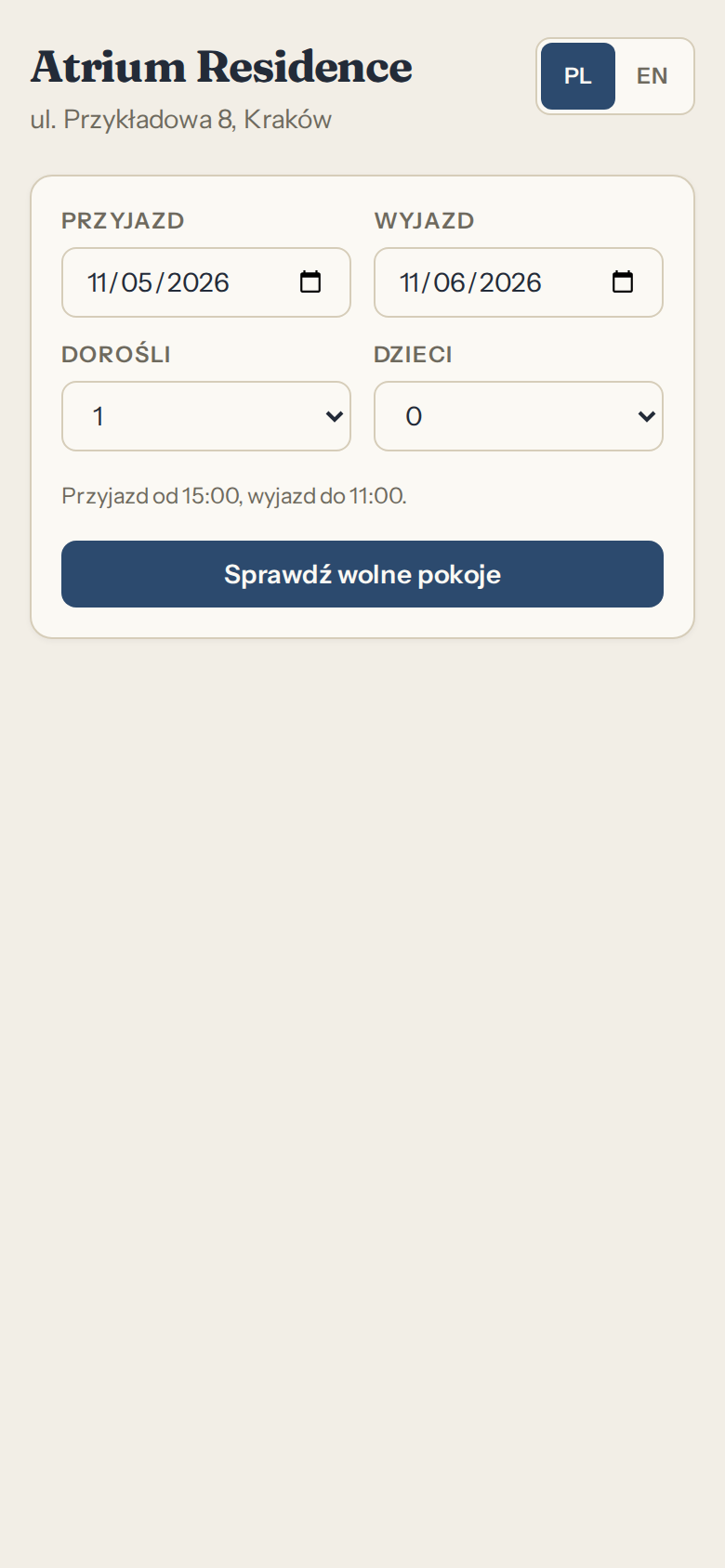
Four steps, with no account to create. The page works in Polish and English, and the guest picks the language.

  1. Arrival, departure, number of adults and children
  2. Free rooms with the price for the whole stay and per night
  3. Name, email, phone, notes
  4. A reservation number and a link to it, also by email, and transfer details if you require a deposit
Atrium panel screen: Reservations on your website

Reservations on your website

A deposit by bank transfer, with a deadline and a reminder

In settings you choose a percentage of the stay price or a fixed amount, a deadline in hours after booking, an account number and a recipient. The guest makes the transfer from their own bank. Atrium does not take online payments and does not connect to your account, so reception records the payment when it shows up there.

  1. Hour 0

    Booking and transfer details

    Before booking, the guest sees the amount and the deadline. After booking they get the recipient, account number, amount and transfer title, on screen and by email.

    Transfer details

    Sample data
    Recipient
    Lakeside Guesthouse
    Account number
    00 0000 0000 0000 0000 0000 0000
    Amount
    PLN 288.00
    Transfer title
    Deposit reservation 4F9A2C17
    Payment deadline
    48 hours after booking

    Stay at PLN 960.00, deposit 30% of the price.

    You make the transfer from your own bank, this page does not take payments.

  2. Hour 24

    Reminder

    A day before the deadline the guest gets an email with the same details, if the payment is not recorded yet. It goes out from 9:00 at the earliest.

  3. Until the deadline

    A payment to record

    The booking list has a Deposit pending filter, and the Today screen says how many are waiting. When you see the transfer on your account, you click Record payment and the amount goes on the booking's folio.

  4. Hour 48

    Deadline

    The panel checks deadlines every 15 minutes, and from here there are three ways on.

Payment recorded before the deadline

In the panel
Deposit paid, the amount is on the booking's folio.
Guest
Gets an email saying the deposit arrived and counts towards the price of the stay.
Room
Stays with the guest.

After the deadline: only mark as overdue

In the panel
Deposit overdue. The booking stays on the room chart with a marker, and reception decides whether to cancel it.
Guest
Gets no new email. Their reservation page shows Past the deadline.
Room
Stays occupied.

After the deadline: cancel automatically

In the panel
Booking cancelled, with an entry in the activity history.
Guest
Gets an email about the cancellation. If the transfer has already gone out, they are asked to contact the property.
Room
Goes back on sale.

Automatic cancellation applies to website bookings. Bookings from the panel and those with the deadline on the arrival day are only marked as overdue.

You can also set a deposit on a booking from the panel, but the reminder and the payment confirmation only go to guests who booked on the website.

A code to paste, or just the link

In settings you copy the ready code and paste it where the form should go on your site. With no site, you send the link on Facebook, by email or from your Google business profile. You choose the link address yourself.

A sample part of a property website with the code from settings

<h2>Book a room</h2><iframe src="https://app.atriumpanel.pl/book/atrium-residence" title="Atrium Residence" style="width:100%;height:820px;border:0" loading="lazy"></iframe><p>Directions and contact</p>

You paste one line, the highlighted one. The rest of the page stays as it is.

No commission, a fixed subscription price

You pay for the number of rooms, whether three bookings come in this month or thirty. The guest settles with you however you agree: you can require a deposit by transfer at the time of booking, and you enter every payment on their folio.

This is an example to work through, so enter your own numbers. The portal commission is in your contract with the portal.

Booking through a portalBooking on your website
Stay valuePLN 960.00PLN 960.00
Commission-PLN 144.00PLN 0.00
Left with youPLN 816.00PLN 960.00

Difference at 30 bookings, if all of them come through your websitePLN 4320.00

The Atrium subscription depends on room count and not on bookings: PLN 99, PLN 199, PLN 399 per month, depending on the tier.

Portal commissions stay with the portals, because that is your contract with them. Atrium neither takes nor lowers them.

Calendars with portals: occupied dates, no prices

Each room has its own calendar. You paste the portal's iCal address into the panel and give the portal the address from Atrium. The panel reads the portal every 15 minutes and blocks the room, also for website bookings, while the portal reads your calendar at its own pace. Only occupied dates cross over, so you change prices on each portal separately and read guest details there.

  • Website booking: guest details are in the panel
  • Portal dates: occupied dates only

Sample data

Where the risk of selling dates twice comes from

The panel reads the portal: every 15 minutes

Airbnb reads your calendar: every 3 hours

Here the portal may not know about a new booking yet
  • Between refreshes the same dates can be sold twice: Airbnb states an update every 3 hours
  • You turn a portal's dates into a booking in the panel, and its source is set to platform
  • Booking.com allows calendar sync with at most one unit per room type, so several identical doubles have to be split into separate types there

You set the prices, the cancellation term and the terms of booking

Prices come from room types, seasons, weekend rates and surcharges, and the minimum stay and closed dates apply here too. You decide how many hours before arrival a guest can cancel online. You write your own booking terms, and for each booking the panel stores the date of consent and the text the guest accepted.

  • An online booking covers up to 90 nights, and for longer stays the guest asks you directly
  • After the cancellation deadline, the guest's reservation page tells them to contact you

Booking settings

Sample data
Confirmation
After approval in the panel
Guest cancellation
48 hours before arrival
Longest online stay
90 nights
Booking terms
Your own text
Stored with each booking
Date of consent and the text of the terms

Emails to the guest, in Polish or English

The language follows the one the guest booked in. Each email has the reservation number, dates, stay price and your property's details. This applies to website bookings: when you type a booking into the panel by hand, no emails go to the guest by themselves until you pass on the check-in link.

You get an email about every new booking and every guest cancellation, at the address in your property profile.

Confirmation: straight away or after your approval

Your reservation at Atrium Residence is confirmed

Sample data

Your reservation is confirmed

Atrium Residence has confirmed your reservation.

  • Reservation number: 4F9A2C17
  • Arrival: 12 July 2027, from 15:00
  • Departure: 14 July 2027, until 11:00
  • Room type: Double, guests: 2
  • Price for the stay: PLN 640.00. Payment is made as arranged with the property.
  • Property: Atrium Residence, ul. Przykładowa 8, Kraków

View your reservation

This message was sent automatically. For questions about your stay, please contact the property.

Online check-in: the guest enters the details before arrival, and you confirm them at reception

A guest from the website gets an invitation in the booking email, and a reminder two days before arrival if they have not completed check-in yet. For a booking from the panel you send the link by email, or copy it and pass it on yourself. The form works until the arrival day and asks for no document numbers or scans.

Guest form

A link from the email, no login

Card at reception

Check-in ready, 16:30

Full name

Anna Przykładowa

Guest

Anna Przykładowa

Phone

+48 600 000 000

Phone

+48 600 000 000

Home address

ul. Przykładowa 8, 30-000 Kraków, Poland

Address and country

ul. Przykładowa 8, 30-000 Kraków, Poland

Expected arrival time

16:30

Arrival time

16:30, shown on the Today screen, the floor map and the booking list

Person 2

Jan Przykładowy, same address

People

Anna and Jan Przykładowy

Local fee exemption

Person accompanying someone with a disability

Exemption

To confirm: it counts only once reception approves it

Company invoice

Firma Przykładowa sp. z o.o., NIP 000-000-00-00

Invoice details

Firma Przykładowa sp. z o.o., NIP 000-000-00-00

Sample data. The form collects other people and exemptions only when you have the visitor fee switched on.
  • At check-in, the address and phone from the form move to the guest card
  • The registration card to print carries the check-in details, with a space for a signature
  • A guest who skips it checks in at reception as usual

A booking for several rooms: one link, one deposit, a separate folio for each room

A family or a company books several rooms at once for the same dates, up to 10 in one booking on the website, while in the panel you set up a larger group yourself. The deposit is worked out from the total, so the guest makes one transfer. On the room chart each room stands alone, with its own check-in, check-out and folio, and you can also handle the whole group with one button.

The guest has one number, one link and one transfer

Reservation number
7C31A0E2
Link
One, for the whole booking
Deposit
PLN 972.00, which is 30% of the total, in one transfer

Reception has each room separately

RoomCheck-inStay, nights: 3Share of depositLeft to pay
102, DoubleArrivalPLN 960.00PLN 288.00PLN 672.00
103, DoubleArrivalPLN 960.00PLN 288.00PLN 672.00
201, FamilyArrivalPLN 1320.00PLN 396.00PLN 924.00
TotalPLN 3240.00PLN 972.00PLN 2268.00

Sample data

  • The guest cancels the whole booking or a single room, within the term you set
  • A payment taken from the group is split between the room folios
  • You can issue an invoice for one room or for the whole group
  • In the panel you can also add a room to a booking that already exists
  • The guest completes online check-in once, for all the rooms

Guest portal: requests from a phone, with no account or password

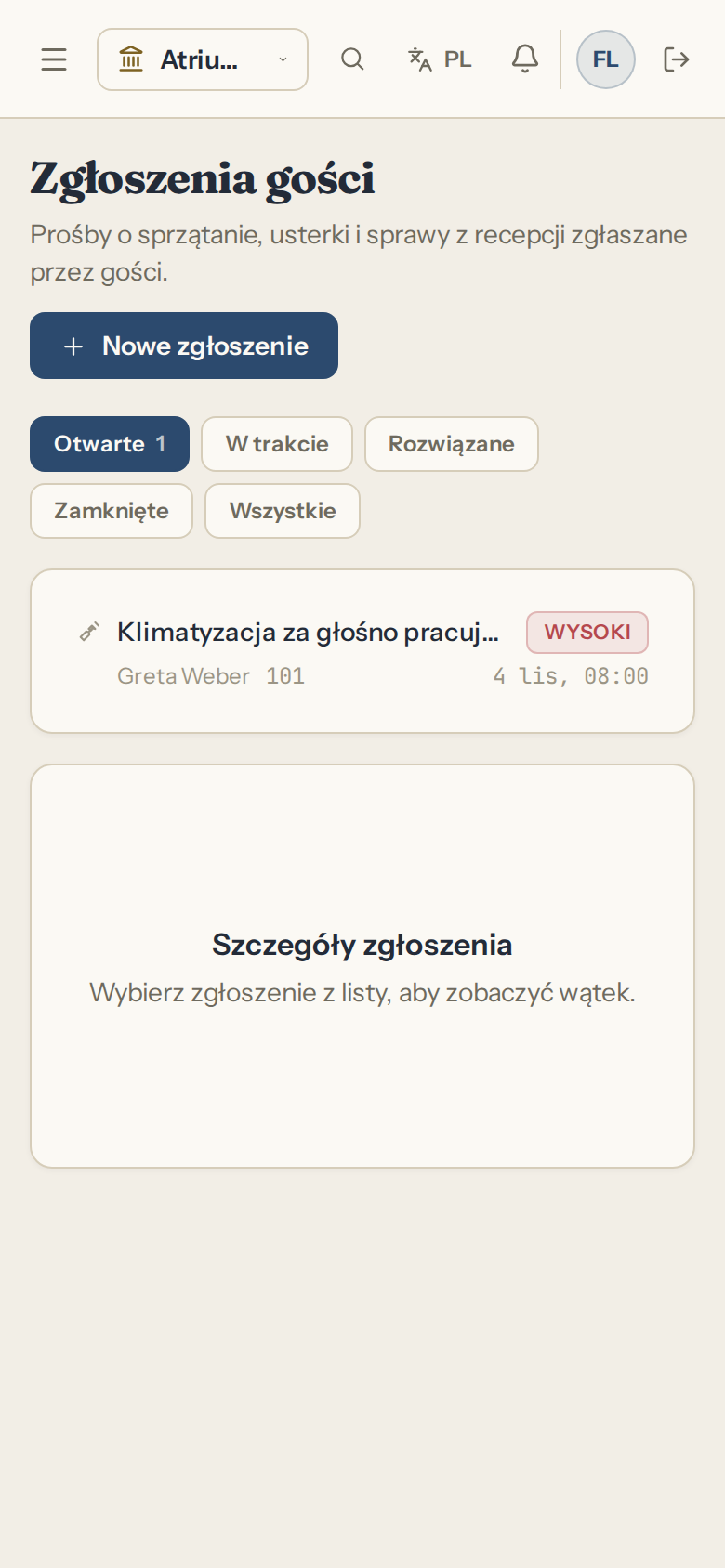
You create the self-service link on the guest card and hand it over yourself. Through it the guest sends requests, say for an extra towel, picks a category and sees your answer. You can revoke the link at any time.

Atrium panel screen: Guest requests in the panel

Guest requests in the panel

Extra towel for room 204

Sample data
Category
Housekeeping

Your answer

The towel will be in your room later today.

Online booking questions

Do I need my own website?
No. The booking page works under its own link, which you send to guests. If you have a site, you paste in the code from settings.
How much commission do you take on a booking?
Atrium takes no commission on bookings. Portal commissions stay with the portals, because that is your contract with them.
How does the guest pay for the stay?
However you agree, because Atrium does not take online payments. If you switch on deposits, the guest gets the transfer details and a deadline, and you settle the rest as arranged with the property. You enter every payment on the folio in the panel.
Does the panel see the guest's transfer by itself?
No. The panel does not connect to a bank. Reception records the payment when it shows up on the account, and a guest from the website then gets an email saying the deposit arrived.
What happens if the deposit does not arrive by the deadline?
That depends on your setting. The panel either only marks the deposit as overdue and leaves the decision to reception, or cancels the website booking itself, releases the room and sends the guest a message.
Does the guest have to complete online check-in?
No. A guest who skips it checks in at reception as usual. The form asks for no document number or scans, and the panel does not store them.
Can a guest book several rooms at once?
Yes, up to 10 rooms in one booking on the website, for the same dates. They get one number and one link, and the deposit is worked out from the total. In the panel each room has its own check-in and folio.
Do calendars protect me from double bookings?
They lower the risk but do not remove it. The panel reads the portal every 15 minutes, and the portal reads your calendar less often, Airbnb for example every 3 hours. When dates overlap the panel reports a conflict, and you sort it out with the guest and the portal.
Will the portal send the guest's name?
Do not count on it. The calendar carries occupied dates. You create a booking from those dates and fill in the name, address and party size by check-in at the latest, because the fee register and KT-1 need them.
Does changing a price in Atrium change it on the portal?
No. Your rate list applies on your website. You change prices on each portal separately.
Can an email fail to reach the guest?
Yes, like any email, for example with a typo in the address. That is why the guest sees the reservation number and a link to it on screen right after booking.