1Room floors

A plan of your building that shows who is asleep, what is free and what needs cleaning

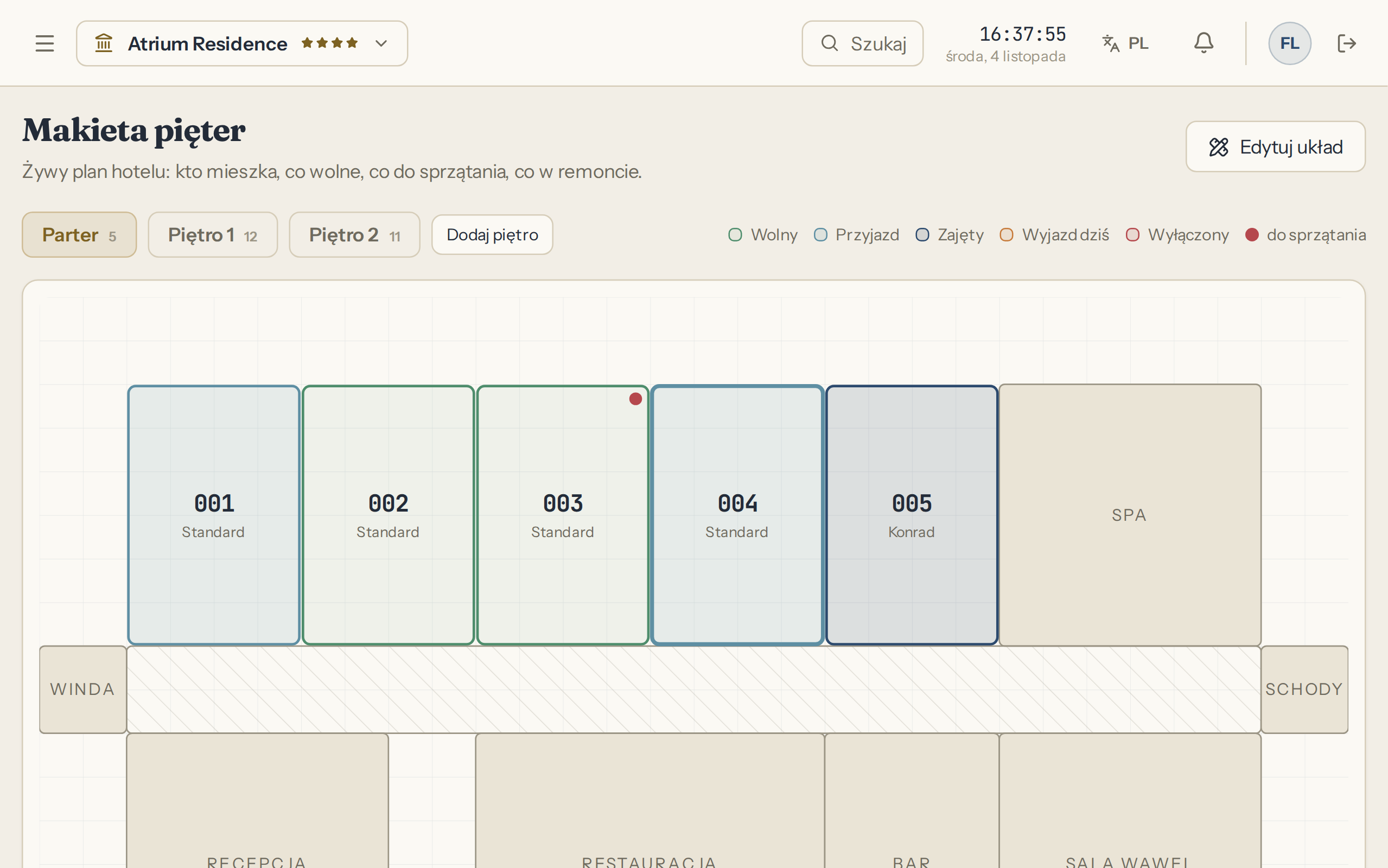
The floor map is a working screen. From it you check guests in and out and mark a room as clean. A room's state comes from bookings, renovations and the cleaners' work, so nobody retypes it by hand.

Click a room and deal with it on the same screen

Room details open next to the plan: who is staying, for how many nights, whether there is an arrival today. From here you check a guest in or out, open the folio and change the housekeeping status.

LiftCorridorStairs
Storage
  • Free
  • Arrival
  • Occupied
  • Departs today
  • Out of service
  • needs cleaning

Sample data. Click a room, and the buttons work on this plan.

What reception sees for this room

Room 102

Departs today

Guest
Jan Kowalski
People
2
Nights
2
Arrival today
No
Housekeeping
Clean
Folio
PLN 640.00

Five room states and a dot for cleaning

Free, Arrival, Occupied, Departs today, Out of service. After checkout a room also gets a needs-cleaning marker, so you can tell an empty room from one that is ready for a guest. The plan refreshes itself every 30 seconds.

Atrium panel screen: Floor map

Floor map

You draw each floor once, by dragging rooms

Type a range of numbers such as 101-110 and the rooms land on the plan. Then in edit mode you move them to match the building. Rooms and floors can be added at any time.

  • Corridor, lift, stairs and reception
  • Restaurant, bar, conference room and spa
  • Storage room and toilets

Room numbers101-110

101102103104105LiftCorridorStairs106107108109110ReceptionRestaurantBarWCConference roomSpaStorage

A room type holds the price and the capacity

Double, family, apartment: a type is a nightly price and a capacity shared by many rooms. You set seasons from date to date, and weekends can have their own price. A stay across two seasons is priced night by night.

  • Seasons of the same type cannot overlap
  • Each type has its own VAT rate, set by the owner

Room types and nightly prices

Sample data
TypePeopleOff seasonSeasonWeekend
Double2PLN 280PLN 320PLN 360
Family4PLN 380PLN 440PLN 490
Apartment3PLN 520PLN 590PLN 650

A double across two seasons, night by night

  1. 1Off seasonPLN 280
  2. 2Off seasonPLN 280
  3. 3SeasonPLN 320
  4. 4WeekendPLN 360
Price for the stay
PLN 1240.00

The price of every night and the stay rules in one calendar

A room type has a base price and a price for chosen weekdays, and a season from date to date can have both of its own. You set surcharges for extra people on the type, and board for the whole property, per person and night. You set the minimum stay and days without arrival or departure for the type and for the season, and you close dates for one type or the whole property.

  • In the price calendar in the panel you click the first and last day to set a price or close the dates
  • A guest on the booking page cannot get around these rules and sees why a room is unavailable
  • In the panel, reception gets the same message, and a manager can knowingly override it, with an entry in the activity history

June 2027, family room

Sample nightly prices in PLN, two guests included

  • Off season
  • Season from June 14, minimum stay 3 nights
  • Bold price: Friday and Saturday
  • No arrival on Sundays in the season
  • Closed dates

Click the arrival day, then the departure day.

Price of this stay

Sample data

June 11 to 15, nights: 4

  • June 11-12Friday and Saturday price, nights: 2, at PLN 490.00PLN 980.00
  • June 13off season, nights: 1, at PLN 380.00PLN 380.00
  • June 14season, nights: 1, at PLN 440.00PLN 440.00
  • Price for the stayPLN 1800.00

The cleaning queue sorts itself

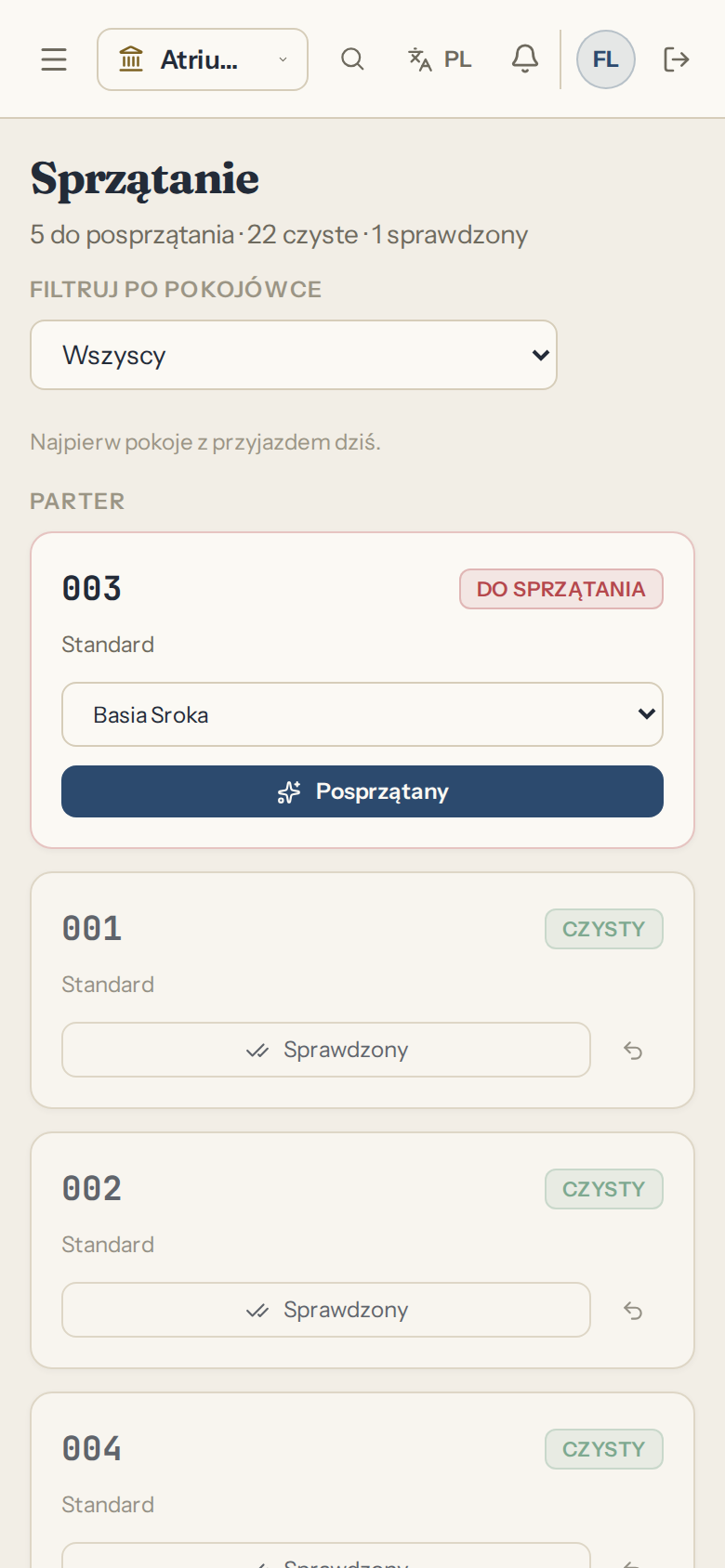
Checkout puts the room on the list. Rooms with an arrival today go to the top, because those are the ones holding up check-in at 15:30. The status moves from needs cleaning through cleaned to inspected.

Room 102

You assign a cleaner

The room waits on the list, and the dot on the floor map says it is empty but not ready for a guest yet.

On the floor map: Free, with a needs-cleaning dot

Cleaning list

  1. 205Arrival today
  2. 102
  3. 103

Sample data

Cleaners log in from a phone browser

You invite each one by email with the Staff role. They filter the list by name and tick rooms off on the phone, and reception sees the change on the floor map. That account cannot open reports, cash or settings.

  • The list filters by cleaner
  • Rooms with an arrival today sit at the top
Atrium panel screen: Housekeeping

Housekeeping

An issue has a room, a priority and a cost

Write what is wrong, pick a room or a common area, and set a priority. The issue moves from open through in progress to resolved, and on closing you enter the repair cost. Maintenance costs add up on the list, so at the end of the season you know what the plumbing cost you.

  • A guest's report arrives through the guest portal, and you open the issue from it
  • The Today screen shows open issues

Issues

Sample data
  • Dripping tap

    105

    high, in progress

    entered on closing

  • Door lock sticking

    203

    medium, resolved

    PLN 180.00

  • Blown light on the stairs

    Common area

    low, resolved

    PLN 45.00

  • Cracked pipe in the bathroom

    204

    urgent, resolved

    PLN 620.00

Maintenance costs
PLN 845.00

A renovation closes the room to bookings

A renovation has a name, dates and a budget. While it lasts the room takes no bookings, including from your website, and trying to enter one by hand ends with a message naming the renovation. The KT-1 summary takes such rooms out of the nominal count.

Room 104, days 1 to 10

Bathroom painting
New booking

This room is blocked for these dates by a renovation: Bathroom painting.

Sample data

Floor map questions

Do I need to know how to draw plans?
No. You type room numbers and the panel lays them out. The exact layout is a matter of dragging, and if you skip it the map still works.
Do cleaners need an app?
No. They open the panel in a phone browser and log in to their own account. You create the account with an invitation sent to their email address.
Does a room with an issue stop taking bookings?
An issue on its own does not block the room. A dated renovation or switching the room out of service does, so that decision is yours.
How does the panel know a room is dirty?
Checking a guest out marks the room as needing cleaning. You can also change the status by hand, for example after a leak or before an important arrival.
Can several computers see it live?
Yes. The floor map refreshes itself every 30 seconds on every device that has it open.
I have two buildings. Will this work?
Yes, if you add them as separate floors of the plan, for example House A and House B. Create a separate property when it needs its own fee register and its own accounts.
Can the separate price apply on days other than Friday and Saturday?
Yes. You choose the days with a separate price yourself, for the room type and separately for the season. By default they are Friday and Saturday.
Can a minimum stay apply only in the season?
Yes. A season can have its own minimum stay, and without one the room type's minimum applies. When a stay crosses several periods, the longest requirement counts.
How do I close the property for a few days?
In the rates tab you pick the range and close the dates for the whole property or one room type. Nobody can then book a night on those days, while a departure can fall on the first closed day.